我要找能在gnome-panel顯示的小時鐘,意外發現glunarclock月晷監看月球即時相位,不知道有沒有人有用。
使用指令安裝
sudo aptitude install glunarclock


 使用火狐在噗浪上不知道你們都習慣怎麼RePlurk,本來我都用油猴的RePlurk Script,但都有個缺點,讓你一開始載入噗浪的河道,會變很慢很慢才會顯示完整。
 微調系統後對我來說較為便利,比較適我的使用方式,像關機或重新啟動還要等待60秒或按下確定按鈕,這點對我來講是沒必要的。
gconftool-2 --type bool -s /apps/update-notifier/auto_launch false
gconftool-2 --type int -s /apps/update-notifier/regular_auto_launch_interval 0
gconftool-2 --type bool -s /apps/indicator-session/suppress_logout_restart_shutdown true
gconftool-2 --type=Boolean --set /apps/nautilus/preferences/always_use_location_entry true
gconftool --set /desktop/gnome/interface/menus_have_icons --type bool true
gconftool --set /desktop/gnome/interface/buttons_have_icons --type bool true
sudo add-apt-repository ppa:pabluk/ppa
sudo aptitude update
sudo aptitude install mwbuttons
dpkg -S /usr/lib/firefox-addons/searchplugins/language-pack-zh-hant-base, firefox: /usr/lib/firefox-addons/searchplugins

find /usr/lib/firefox-addons/searchplugins/usr/lib/firefox-addons/searchplugins
sudo rm -r /usr/lib/firefox-addons/searchplugins
 因為寫Linux Pilot月刊的稿子,內容有提到Adobe AIR才發現它跟FlashPlayer一樣,並沒有提供amd64版本,筆者本來打算自己編一個deb的,所幸找到人家寫好的腳本腳本,就不用自己動手了(沒經驗也不會XD)。
wget -c http://dl.dropbox.com/u/1776325/ubuntu/install-adobe-air-ubuntu-64bit.sh
chmod +x install-adobe-air-ubuntu-64bit.sh
sudo ./install-adobe-air-ubuntu-64bit.sh


echo "deb http://archive.canonical.com/ubuntu $(lsb_release -cs) partner|sudo tee -a /etc/apt/sources.list
sudo aptitude update
sudo aptitude install adobe-flashplugin
sudo aptitude install nspluginwrapper
GDK_NATIVE_WINDOWS=TRUE firefox看還會不會發生,或者,使用社網友提供的方法 其一 其二

sudo rm /usr/lib/gnash/libgnashplugin.so


sudo sed -i '/virtualbox\/debian/d' /etc/apt/sources.list
sudo apt-add-repository "deb http://download.virtualbox.org/virtualbox/debian $(lsb_release -cs) non-free
"
echo "deb http://download.virtualbox.org/virtualbox/debian $(lsb_release -cs) non-free
" |sudo tee -a /etc/apt/sources.list
wget -q http://download.virtualbox.org/virtualbox/debian/oracle_vbox.asc -O- | sudo apt-key add -
sudo aptitude update
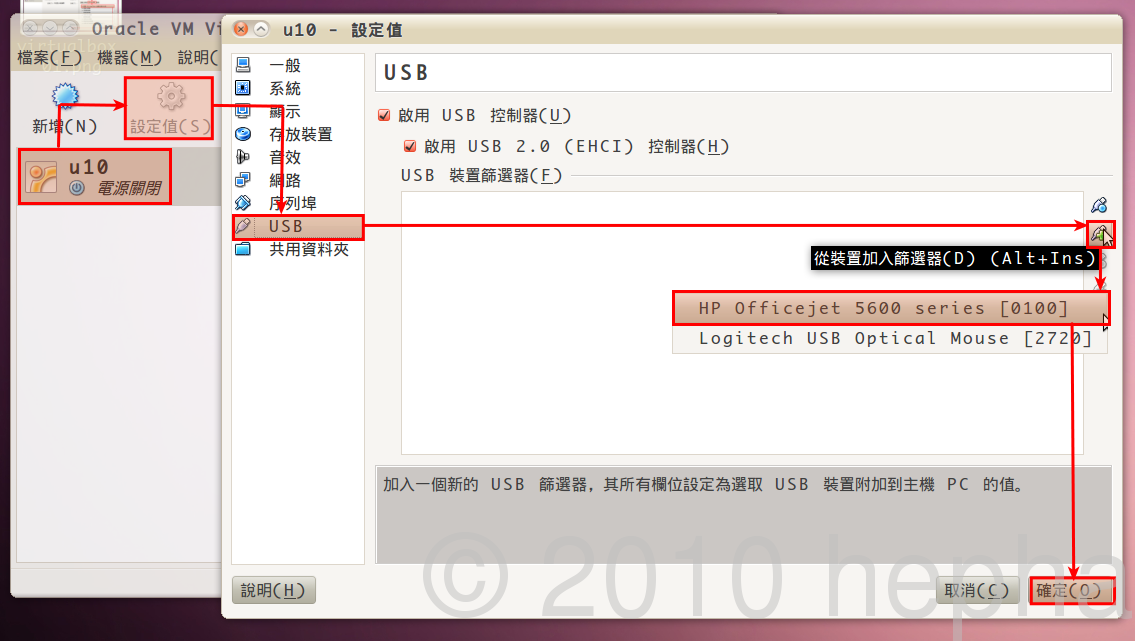
sudo aptitude install virtualbox-3.2


sudo aptitude install python-mutagenbig5轉Unicode
mid3iconv -e big5 --remove-v1 *.mp3gbk轉Unicode
mid3iconv -e gbk --remove-v1 *.mp3有些使用big5轉碼還是亂碼,可能檔案是gbk編碼,可以在轉一次試試看是否正常。
cdcopy and pass
gedit miconv
#!/bin/bash給執行權限
IFS=""
find . -type f -iname \*.mp3 -execdir mid3iconv -e big5 --remove-v1 -q "{}" \;
#find . -type f -iname \*.mp3 -execdir mid3iconv -e gbk --remove-v1 -q "{}" \;
chmod +x miconv使用方式為
~/miconv

gconftool-2 --set --type bool /apps/gnome-power-manager/lock/gnome_keyring_hibernate false
gconftool-2 --set --type bool /apps/gnome-power-manager/lock/gnome_keyring_suspend false